
AltoPlex devices are equipped with a single LED, showing both red and green lights to indicate power, connection and activity.
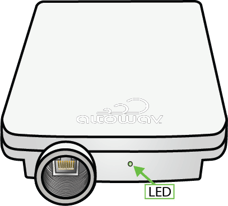
The light sequences indicate the state of the unit. The following table shows the meaning of the light sequences.
|
LED behavior |
Indicates |
|
|
|
Solid red |
Device is powering up. |
|
|
Slow flashing green |
Device is waiting for GPS to synchronize. Only applies if the device is functioning in a distribution node (DN) role. If the device is the wireless responder in a DN-DN link, the LED will stop slow flashing once a connection to the wireless initiator has been established, whether or not GPS has synchronized on the responder. |
|
|
Flashing green |
Device is waiting to form a wired connection and at least one wireless connection. |
|
|
Solid green |
Device has a wired connection and at least one wireless connection. |
|
|
Flashing red/green |
Device is in locate mode. |
|
|
Flashing red/green, pausing, then flashing red/green again. |
Device is booting and ready for the factory reset button to be pressed. The device will stay in this mode for approximately ten seconds, or until the factory reset button is pressed. See Factory Reset for information about performing a factory reset. |
|
|
Flashing red, pausing, then flashing green, pausing, then repeating. |
The factory reset button has been pressed and the device is performing a factory reset. |
|
|
Flashing red, pausing, then repeating. |
Error condition. |


