
How to Find the Original IP Address of the Unit
When direct access to a unit is needed after a factory reset or for direct configuration of a new unit, the IP address is required.
All units are shipped with an original IP address which follows the IPv4 pattern of 169.254.#.#, where the last two octets are randomized. The units have a temporary label listing the units’ IP and MAC address. Keep this information in your records.
If the IP address is unavailable, go to support.altowav.com for help obtaining the original IP address, using the Serial Number on the unit’s permanent label.
Factory Reset Instructions
The easiest way to reset to factory defaults is using the Restore Factory Defaults button on the Admin tab of the WebUI or the equivalent CLI command.
If you cannot access the WebUI or CLI because of a lost password, incorrect VLAN configuration or the IP address has been changed to an unknown value, you can use a reset cable as shown in the instructions below. Instructions for making a reset cable follow the reset instructions.
Note: Factory reset returns the unit’s login to the default: “kwikbit”. Factory reset also returns the IP address of the unit back to the original IP address. How to find the original IP address.
To reset the device to factory defaults:
- Disconnect power by removing the connector in Port 1.
- Insert the reset cable into Ethernet Port 2.
- Reconnect power to Port 1. During power-up, observe the LED.
-
The red and green repeating sequence indicates the K60 is resetting:


 repeating.
 - After the repeating LED sequence completes, remove the reset cable.
- The device is now operating at factory default settings.
To make a reset cable from an unused Ethernet cable:
- Cut an easy to manage length, typically 12” or less, from an Ethernet cable, leaving the RJ45 plug on one end.
- Remove the outer jacket from the cut end of the cable and separate the wires for pin 1 and 2. (For straight-through T568B pinout wiring this is the orange/white and orange pair.)
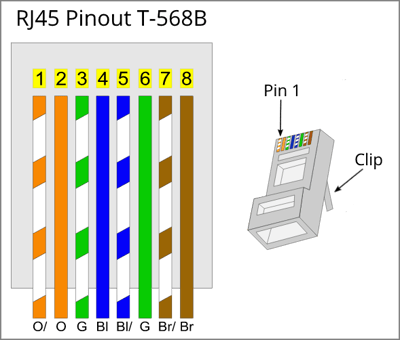
- Short out the pin 1 and pin 2 pair of wires by stripping the insulation and twisting the conductors together. Leave the rest of the wires open.
- Break off the locking tab (clip) from the plug, but leave the plug intact. This makes it easier to insert and remove the plug from the unit. The reset cable is ready to use.