
Status tab
The Status tab shows a summary of information about the unit, its wireless and LAN connections, and interface information.
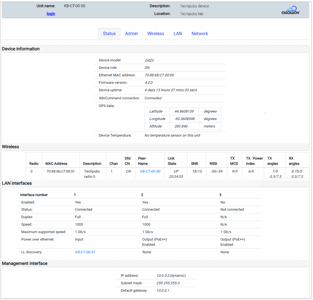
Status tab — Device Information section
This section displays:
- The Device model name (D423 above).
- The Device role — distribution node (DN) or client node (CN).
- The MAC address.
- The current firmware version.
It is generally recommended that all devices in the network use the same firmware version. See Upgrading Firmware for information about upgrading the radio's firmware.
- Device uptime.
- If unit is DN, AltoCommand server status. (This feature requires AltoCommand version 4.0.)
Displayed values are:
- Not configured — The AltoCommand server has not been configured on the radio.
- Disconnected — The AltoCommand server has been configured on the radio but is not connected. Possible issues include an incorrect URL for the server, network access issues, etc.
- Pending — The AltoCommand server has been configured and successfully accessed, and the radio is waiting for the server to accept the connection.
- Connected — The radio is successfully connected to the configured AltoCommand server.
- GPS data.
- Device temperature.
Status tab — Wireless section
The table in this area shows wireless link status for the unit. Use the horizontal scroll bar to view all values.

- Link State lists the state of the link and the length of time that the link has been up or down. Values are:
- Up — The link is functioning normally.
- Up but blocked — The link is formed but is being blocked by Spanning Tree Protocol.
- Down — The link is down. Includes the number of unsuccessful linkup attempts.
- SNR, RSSI, TX MCS, TX Power Index, TX angles, and RX angles show values for both ends of the link, in local/remote order.
- TX angles and RX angles refer to the beam angle when looking from behind the radio towards the linked peer.
- A positive value refers to the beam angle to the right of boresight.
- A negative value refers to the beam angle to the left of boresight.
The hostnames listed under Peer-Name are clickable links and will open the radio's WebUI in a new browser tab.
With a CN, this section only displays information about the device's wireless connection to a distribution node.
Status tab — LAN interfaces section
This section shows information for the LAN interface (Port 1 for the D423), including whether the port is enabled, its status (Connected or Not connected), duplex mode, speed, maximum supported speed, and PoE mode.
If the device's Ethernet port is connected via a switch to other AltoPlex devices, the hostnames of connected devices will be included in the LL Discovery field. Clicking a device's hostname in the LL Discovery field will open the WebUI for that device. This is useful to determine which devices are co-located (for example, devices that are installed on the same pole).
LL Discovery requires that the devices are connected by an unmanaged switch, or a managed switch that is configured to forward LLDP packet information.
Status tab — Management interface
This section lists the IP address, Subnet mask and Default gateway of the radio's management interface. The IP address field also displays whether the radio is configured to have a dynamic IP address assigned by an upstream DHCP server, or a static IP address. See Management Network Interface Configuration for more information.