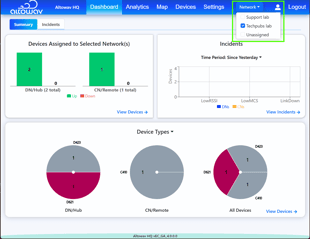
You can filter the information displayed in AltoCommand based on the selected Network. You can:
- View device information for one or more specific Networks.
- View all devices accepted on this instance of AltoCommand.
- View all devices that are not assigned to any Network. This is useful when new devices have been added, to determine which devices need to be assigned to Networks.
-
Open the AltoCommand WebUI:
In your browser's address bar, type:
https://hostname
where hostname is the fully qualified domain name of the AltoCommand server.
-
Log into the WebUI as a user with either user or admin privileges.
The AltoCommand WebUI opens to the Dashboard.
Information displayed in the Dashboard is filtered based on the Network selection. This is true for all windows in the WebUI until the Network selection is changed.
- To change the Network selection, from the menu bar, click Network and select the appropriate Network or Networks.