
There are two methods to factory reset the AltoReach radio:
- Software-based factory reset using the WebUI.
- Hardware-based factory reset using the reset button on the device.
Factory reset using the WebUI
- Log into the AltoReach device as described in Connect to the AltoReach device.
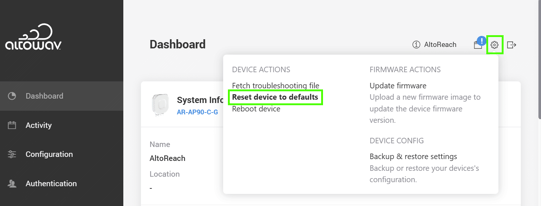
- In the WebUI, click the Tool icon ().
- From the menu, select Reset device to defaults.
Factory reset using the reset button
Only perform a factory reset with the reset button after the device has fully booted up (has been operational for approximately five minutes). This procedure will not work if factory reset with the reset button has been disabled in the WebUI.
- After the radio has fully booted, at the bottom of the radio, remove the screw covering the reset button.
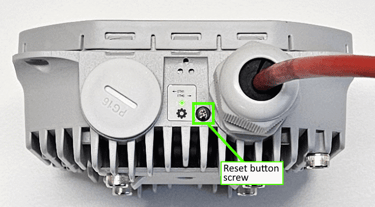
- Insert a wood or plastic pin into the factory reset button. Push down and hold for at least 20 seconds.