
Skip to content
  • There are no suggestions because the search field is empty.

Device LEDs

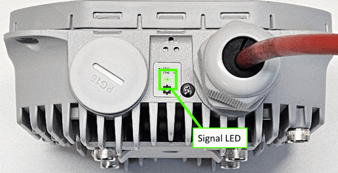
AltoReach devices have one LED indicator, called the Signal LED, that provides link information. There are also LEDs for the Ethernet port.
LED  Description
Signal LED
  • Off — Indicates one of the following:
    • The device is currently operating in AP mode.
    • The device is powered off
    • The radio modem is not detected.
  • Blinking slowly — The device is in station or point-to-point mode and is currently scanning.
  • Blinking with a medium speed — The device is in station or point-to-point mode and is connected with a low signal.
  • Blinking fast:
    • Case 1 — If the unit is just booting up, the device is flashing the internal modem firmware.
    • Case 2 — If the unit is fully booted, then the device is in station or point-to-point mode and connected to an AP with a medium signal strength.
  • Solid — The device is in station or point-to-point mode and connected with an excellent signal strength.
ETH0 Ethernet port LEDs The link light will turn on when a link is established, and the power light will turn on once the device is supplied with power.