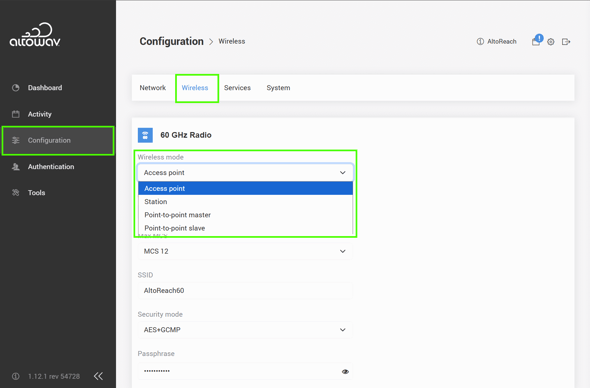
Wireless mode determines the role that the AltoReach device performs in the network. Device can be have one of four roles:
- Point-to-multipoint:
- Access point — The hub of the PtMP network.
- Station — A remote or client node connected to the access point.
- Point-to-point:
- Point-to-point master — The local node connected to the backhaul network.
- Point-to-point slave — The remote node connected to the PtP master.
By default, the AltoReach AP90 is configured in the access point role, and the AltoReach S150 is configured in the station role.
- For point-to-multipoint links using one AP90 and multiple S150s, the radios should be left at their default settings.
- Any remote AP90s should be set to Station mode.
- For point-to-point links, set each device in the pair to Point-to-point master or Point-to-point slave.
To configure Wireless mode:
- Log into the AltoReach device as described in Connect to the AltoReach device.
- In the WebUI, click Configuration.
- Click Wireless.
- For Wireless mode, select the appropriate option.
- Click Save & Reboot.