
To configure wireless settings for the AltoReach device:
- Log into the AltoReach device as described in Connect to the AltoReach device.
- In the WebUI, click Configuration > Wireless.
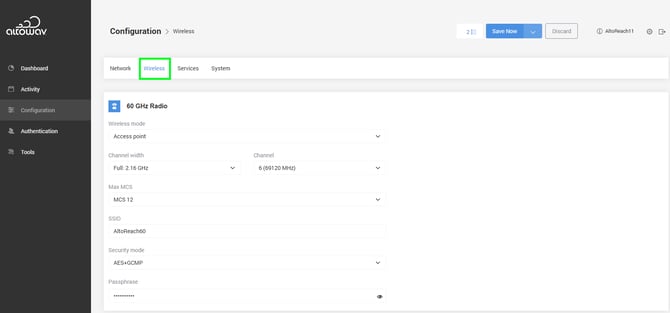
- Select the Wireless mode.
Wireless mode determines the role that the AltoReach device performs in the network. Device can be have one of four roles:
- Point-to-multipoint:
- Access point — The hub of the PtMP network.
- Station — A remote or client node connected to the access point.
- Point-to-point:
- Point-to-point master — The local node connected to the backhaul network.
- Point-to-point slave — The remote node connected to the PtP master.
By default, the AltoReach AP90 is configured in the access point role, and the AltoReach S150 is configured in the station role.
- For point-to-multipoint links using one AP90 and multiple S150s, the radios should be left at their default settings.
- Any remote AP90s should be set to Station mode.
- For point-to-point links, set each device in the pair to Point-to-point master or Point-to-point slave.
- Point-to-multipoint:
- For Channel width, leave at Full: 2.16 GHz.
- For Channel, select the channel. See Configure the channel for more information.
- For Max MCS, select the maximum allowed MCS.
When aiming devices, it may be useful to set this to MCS 9, to have a more stable signal.
- For SSID, Security mode, and Passphrase, see Conifgure the 60GHz SSID, Security mode, and Passphrase for details.
- (Stations only) Station Profiles are disabled by default.
When enabled, station profiles disable the device's SSID and security settings and use the settings from the station profiles instead. This allows the station to be configured to connect to multiple access points (that is, multiple SSIDs) based on availability of the SSID.
- Toggle on to enable.
- Click + Add to create a new station profile.
- Priority can be set to 1 through 10. Multiple profiles can have the same priority.
- For SSID, type the SSID of the access point for this profile.
- For Security Mode, select the security mode used by the access point.
- For Security Passphrase, type the passphrase used by the access point.
- To delete a profile, click X.