
Channels
Channels are a mechanism used by AltoReach devices to avoid interference within the 60GHz spectrum. AltoReach devices use six channels:
| Channel | Frequency (mid-point) |
| 1 | 58320 MHz |
| 2 | 60480 MHz |
| 3 | 62640 MHz |
| 4 | 64800 MHz |
| 5 | 66960 MHz |
| 6 | 69120 MHz |
Impact of oxygen absorption on channel selection
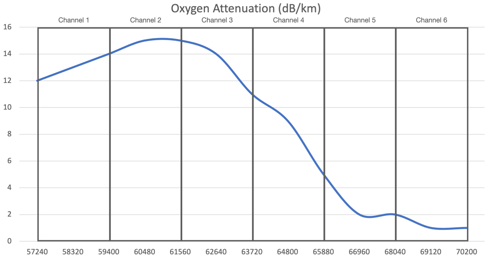
Oxygen absorption has a significant impact on signal levels in the 60GHz band, and is most significant for channels 2 and 3. Channel 1 is less impacted by oxygen absorption channels 5 and 6 are minimally impacted by oxygen absorption:
This information is useful when planning deployments:
- In high density deployments with shorter links, channels with high oxygen absorption (for example, channel 2) will result in less co-channel interference and will allow for more channel reuse, since the oxygen is reducing the signal quickly past the usable range.
- For deployments with longer links, lower oxygen absorption in the upper channels (particularly channels 5 and 6) allows for longer connections.
Configure the channel
Channel configuration is only performed on devices functioning in access point or point-to-point master mode. Devices functioning in station mode or point-to-point slave mode inherit the channel setting from the access point or point-to-point master they are linked to.
- Log into the AltoReach device as described in Connect to the AltoReach device.
- In the WebUI, click Configuration.
- Click Wireless.
- For Channel, select the appropriate channel.
- Click Save Now.