
The terms DN and CN are used to describe the role of a device: distribution node or client node. D621 and D423 devices can operate in DN role, and can also operate as high throughput CNs. The role for a radio is configured on the Wireless tab of the WebUI.
Before installation, a network design should be planned and documented. A detailed network diagram prior to configuration and installation can help avoid costly, time-consuming adjustments after installation. Required information for installation and configuration of a radio in DN mode includes:
- The hostname and MAC address of the device, listed as HN: and MA: on the device label. Scan the QR code on the label for a text string that includes the MAC address.
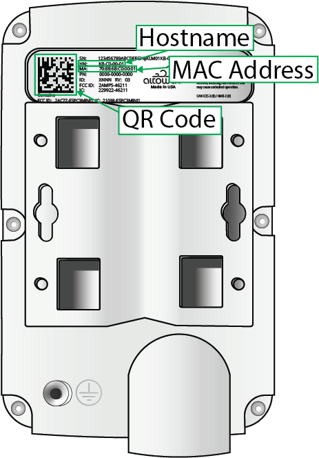
Label sticker
- The planned wireless role (DN or CN).
- The MAC address for this radio's point-to-point partner radio.
- The MAC address for a DN responder — used to form a wireless link with another DN.
- If DN link auto-configuration is being used, only the MAC address of the remote DN responder is needed. Other information is configured automatically.
- If the devices are being configured prior to installation, the MAC addresses for both DN responders in a DN to DN link are required. Additionally:
- The polarity for both devices is required. Linked DNs must have opposite polarity (one even, the other odd).
- The channel, Golay index and polarity.
- The hostname of CN responders - used to configure a wireless link with client devices as they are installed. Note, CN responders should be added to the DN configuration at the time they are installed, not before. The CN's host name is listed as HN: on the device label and included the QR code.
- If VLAN will be used, the Management VLAN ID and PVIDs for this network site.
- Installation site information:
- Planned azimuth for clear LOS between the devices on each end of each wireless link.
- Any elevation changes for the install mount.
- Location/Description information for configuration per your institution's requirements. Consistent information in these fields can be used by monitoring software, such as the AltoCommand, to identify specific devices in dense topologies.
Adopt standard conventions and practices to help simplify design, installation and reading detailed network diagrams.
- Boresight: Position radios at an azimuth that makes DN links as close to boresight as possible.
- Because AltoPlex devices use a wide-angle beam pattern that can scan across a 90° horizontal and +/-20° vertical air space, boresight is not required but will create the strongest link.
- Distance: The shorter a link, the better the performance.