Skip to content
  • There are no suggestions because the search field is empty.

AltoPlex firmware version 4.4.0


Downloads

Radio Models Firmware Download
D621, P621 kb_sw-prod-NOMAD-4.4.0.zip
C423, C420, C410, P421 kb_sw-prod-DEVO-4.4.0.zip
K60DN kb_sw-prod-K60DN-4.4.0.zip
K60CN1 kb_sw-prod-K60CN1-4.4.0.zip


Release Notes

Released January 2, 2026

PDF version of release notes

The 4.2.0 version of embedded code for AltoPlex devices is generally available. This version can replace existing AltoPlex software version 4.2.0 or earlier. These notes include features from version 3.9.1 to 4.2.0.

New features and enhancements

Disable read-only WebUI and REST API

AltoPlex devices now include the Allow read-only web access parameter on the Admin tab, which is used to disable read-only access to the WebUI and the REST API. Admin tab showing Allow read-only web access parameter
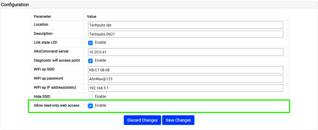
  • When the Allow read-only web access parameter is enabled: 
    • Most information in the WebUI is viewable without being logged into the device.
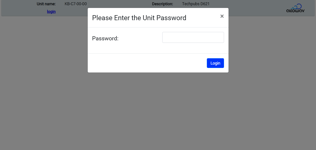
    • Read-only REST APIs do not require user authentication.WebUI login dialog when read-only access is disabled
  • When the Allow read-only web access parameter is disabled:
    • The WebUI presents the user with a login dialog to enter the admin password. 
    • Until the password is entered, no device information is visible other than the device name and description.

All REST API commands except device/node_identity and device/device_status require user authentication.

Limitations fixed in this release

  • The user is now warned that a reboot will be performed when only the SSID and not the passkey is changed through the WebUI.
  • Fixed an issue where baseband asserts caused kernel panics on the D423 when configured as a DN in PtMP mode.
    • The asserts that caused the kernel panics happened while traffic was running. Some other asserts may still happen on the D423 when configured as a DN in PtMP mode when the device is idle and there is co-channel interference.
  • Fixed an issue on the wifi logger for the D423.
  • Fixed an issue where an island condition was created from a misconfiguration when a remote distribution node was incorrectly added as a CN responder.

Ongoing limitations

The following issues have been identified by test or reported and may appear during use:

  • When VLANS are enabled, the L2 max frame size in the downlink direction is only 1592 instead of 1596.
  • Link quality is occasionally degraded after beam refinement.
  • DN link fails to come up after polarity change.
    • This is specific to DN links where the responder is also an initiator for one or more CN links.
    • To recover from this issue, remove all CN links from the responder DN sector, then wait for the DN link to come up, then add the CNs back.
    • This issue can be prevented by removing all CNs from the responder DN sector, then making the polarity change to both DNs, then waiting for the DN link to come up, then adding the CNs back.
  • K60DN beam angles in radio status may be incorrect when different elevation settings are used between sectors.

Release history

Version 4.2.0 November 7, 2025
 

New features and enhancements

  • 60 GHz airlink SSID and encryption passkey

New options to set the 60 GHz airlink SSID and encryption passkey have been added. 

  • In the WebUI, these options were added to the Wireless tab. For the C410 and C420, the Wireless tab did not exist and was added for the 4.2.0 release.
  • Topology scan

New REST APIs and CLI commands have been added to perform a topology scan on a local device to discover nearby radios without knowing their MAC addresses or GPS locations. 

  • Link State display in the WebUI 

A new Link State parameter is displayed as part of the wireless status information in the WebUI. Link State combines the status of the link with the link uptime or downtime. Values are:

  • Up — The link is functioning normally.
  • Up but blocked — The link is formed but is being blocked by Spanning Tree Protocol.
  • Down — The link is down. Includes the number of unsuccessful linkup attempts.
  • Ability to hide the Wi-Fi SSID

For all AltoPlex devices that have the management Wi-Fi feature (currently the D621, P621, P421, and D423), the new Hide SSID configuration parameter allows you to configure the management Wi-Fi to not broadcast its SSID.

  • This parameter is available in the WebUI on the Configuration section of the Admin tab, and the wifi.ap.hidden parameter in the CLI and REST API.

Limitations fixed in this release

  • Improved error handling of orientation RestAPI and CLI commands.
  • Removed wireless.wlan0.CN_responder from CLI config auto-complete on PtP DN devices.
  • Added a check to prevent duplicate CNs from being added to multiple K60DN radios.
  • Fixed issue that caused links to go down on responder DNs when wireless.scan config parameters were changed.
  • Fixed “500 Internal Server Error” that happened when certain invalid data was passed to the configuration/data RestAPI.
  • Improved Ethernet statistics included in the diagnostic file. 
  • Fixed an issue where a DN would need to be rebooted before it could run DN link auto-configuration on a different channel. 
  • Fixed CN stuck in DN mode.
    • When a DN initiates a DN link to a CN, the CN radio changes to DN mode. From this point on the CN will not accept an incoming CN link. To work around this, reboot the CN after the link goes down if it detects that it has wrongly been turned into a DN.
  • Fixed text output of kb_radio_status and kb_topology.
    • Fixed linkup_attempts_since_last_down and link_downtime to show the correct values in kb_radio_status.
    • Added missing linkup_attempts_since_last_down, linkup_time, and linkdown_time values in kb_topology.
Version 3.9.1 August 11, 2025
 

New features and enhancements

  • AltoCommand Cloud Connection
    Note: This feature requires AltoCommand version 4.0 or later. When using AltoPlex radios with previous versions of AltoCommand, the changes described in this section are unused.
    • A new configuration parameter has beenadded to distribution nodes to configure the fully-qualified domain name (FQDN) or IP address of the AltoCommand server.
      WebUI: AltoCommand server parameter on the Admin tab.
      • CLI/REST API: cloud.mgmt.host
      • Client nodes automatically inherit the AltoCommand server configuration from their connected distribution node.
    • A new daemon has been added to AltoPlex radios to open and maintain a reverse tunnel connection to the AltoCommand server.
    • Status information about the AltoCommand connection has been added.
      • WebUI: AltoCommand connection on the Status tab.
      • CLI: AltoCommand connection in kb_device_status.
      • REST API: cloud_state entry in the device/device_status API.
      • Displayed values are:
        • Not configured — The AltoCommand server has not been configured on the radio.
        • Disconnected — The AltoCommand server has been configured on the radio but is not connected. Possible issues include an incorrect URL for the server, network access issues, etc.
        • Pending — The AltoCommand server has been configured and successfully accessed, and the radio is waiting for the server to accept the connection.
        • Connected — The radio is successfully connected to the configured AltoCommand server.
  • WebUI improvements
    • When the radio’s hostname (KB name) is entered in DN_responder fields, rather than the MAC address, the hostname is now automatically converted to the MAC address.
    • When incorrect information is entered for a configuration parameter, the name of the parameter is included in the error message.
    • Tooltip descriptions for fields that require MAC addresses and hostnames have been improved.
  • GPS improvements
    • The response data for the device/gps_status REST API endpoint, and output from the kb_gps_status CLI command, now include multiple sections:
      • best — The most accurate set of GPS coordinates reported by the GPS module since the radio booted.
      • latest — The most recent set of coordinates reported by the GPS module.
      • location — (This section existed prior to 3.7.1.) GPS coordinates that were cached when the radio first synchronized. 
    • Disabled external GPSD client connections.
  • REST API improvements
    • Hostname validation added to REST API endpoints
      • Due to the possibility of IP address reuse in DHCP environments, a new global, optional kb_name=hostname parameter can now be used to validate the identity of the radio when executing a REST API call. 
      • hostname takes the format of KB-XX-XX-XX and is case insensitive.
  • The REST API landing page, https://hostname/rest/v002/, has been improved:
    • A link to the REST API documentation has been added to the landing page.
    • Formatting has been improved.
    • Added output format parameter to the orientation RestAPI endpoint to allow for text format in addition to the default json format.
  • CLI improvements
    • Added extended and json options to the orientation command.

Limitations fixed in this release

  • Fixed an issue for C410, C420, and P421 devices, where after a reboot or power cycle, approximately 1% of the time, frames received on the Ethernet interface would be corrupted.
  • Fixed incorrect behavior of various configuration event log messages.
  • When a WebUI user is logged out due to an idle timeout after clicking Locate Unit, disable the locate mode LED sequence.
  • For all AltoPlex devices except the K60DN, Ethernet MAC in the device/node_identity REST API and kb_node_id CLI command response data now returns the administratively assigned MAC address of the device’s bridge. Previously it returned the MAC address printed on the device label, which is assigned to the radio 0 interface. The two MAC addresses are identical except for the first octet: The first octet of the radio 0 MAC address is 70, and the first octet of the bridge MAC address is 72.
  • The WebUI now alerts the user when the device is rebooted or is power cycled from outside the WebUI.
  • Removed nohup output when running kb_restore_defaults CLI command.
  • For devices running in CN mode, remote_ipv4_addr in the device/radio_status REST API and kb_radio_status CLI command now updates if the DN’s IP address changes.
  • The GET method is no longer listed as an allowed method in the error header returned from the security/password REST API.
  • Removed extra line feeds from the end of event messages sent by SNMP traps.
  • Fixed link initiation failures on PtMP K60DN sectors with hybrid polarity.
    • Allow normal polarity types to be used between radios with differing polarities that are on different channels.
    • Only use hybrid polarity types when multiple radios are on the same channel, but have different polarities.
    • During a configuration change, take the affected links down before setting channel, golay, and polarity.
    • This change was also included in the 3.6.1 maintenance release
  • Changed Wi-Fi management access point to accept a password length of up to 63 characters, to match the allowed length in the wifi.ap.password configuration definition.
  • Improved the WebUI error message to help the user understand that they have to extract the software image from the .zip archive before uploading it to the device.
  • The device/orientation REST API now correctly lists the content-type as text/plain for text output.
  • Renamed system.kwikbit configuration names to system.device. When upgrading from previous releases, the names will be converted to system.device. When downgrading to previous releases, the names will be converted back to system.kwikbit..
  • Fixed an occasional incorrect 403 error code when the REST API was busy.
  • Fixed a 404 error on favicon.ico on the REST API landing page.
  • Fixed an incorrect SNMP enterprise MIB ID.
  • Fixed incorrect airtime allocation on K60DN when there were 2 or more sectors with DN links and CN links, and the total number of links on the K60DN was 17 or more.
  • Removed unusable CLI elements:
    • Removed network.ntp.server from the kb_set auto-complete list on C410 and C420 radios, because it does not apply to client nodes.
    • Removed kb_add and kb_del commands from all radio types except the D621, because the only configuration parameter supported by these commands is the CN_responder parameter, which is only configurable on the D621.
  • Removed “Kwikbit” from the software version message in syslog.
Version 3.6.0 May 02, 2025
 

New features and enhancements

  • Simplified fallback default IP address 
    • The default static IP address for AltoPlex radios is now 192.168.0.1. The default gateway is 192.168.0.254.
      • For radios that are upgraded to 3.6.0 from earlier software versions, a factory reset is required to change the default static IP. 
      • Prior to a factory reset:
        • If a static IP address has been set at any point, the static IP address will not be changed.
        • If static IP addressing has never been configured, the default static IP address is 192.168.0.51.
    • AltoPlex radios continue to use dynamic IP addressing by default. 
      • When an IP address is not acquired through DHCP, AltoPlex radios now fall back to the configured static address, or to the default address.
  • MAC filtering
    • AltoPlex devices now have MAC filtering for both source and destination MAC addresses.
    • Source MAC filtering:
      • A new parameter, Ethernet port 1 mac limit, allows you to select the number of allowed source MAC addresses. Up to 10 are supported. 
      • The radio automatically populates an allowlist that contains the first devices that connect to the Ethernet port, up to the configured limit. 
      • Traffic from devices that are not on the allowlist is not forwarded.
      • You can clear the allowlist by either rebooting the radio or making a change to the configuration, at which point a new allowlist will be automatically created.
    • Destination MAC filtering:
      • Two new parameters have been added: 
        • Ethernet port 1 destination mac address allows you to set the destination MAC address that unicast network traffic must contain for the radio to forward the traffic.
        • Ethernet port 1 unicast conversion allows you to convert broadcast and multicast network traffic to unicast and forward that traffic to the specified Destination MAC address.
  • A new REST API endpoint and CLI command have been added to show the current MAC filter configuration, including the current allowlist that the radio is using for source MAC filtering.
    • Rest API endpoint: device/mac_filter_status
    • CLI command: mac_filter_address
  • Device orientation
    • You can now use the REST API or CLI to determine the physical orientation of AltoPlex devices.
      • Rest API endpoint: device/orientation
      • CLI command: orientation
    • Default output lists:
      • The tilt — Forward or backward pitch of the radio.
        • Zero (0) degrees of pitch means that the radio is upright, facing outward at exactly a 90° angle to the ground (i.e., to the downward vector of gravity).
        • A positive number indicates that the radio is facing upward (i.e., toward the sky).
        • A negative number indicates that the radio is facing downward (i.e., toward the ground).
      • The lean — Side-to-side angle of the radio.
        • Zero (0) degrees means the radio is upright, with both the left and right sides at exactly a 90° angle to the ground (i.e., to the downward vector of gravity).
        • A positive number indicates that the radio is leaning to the right, as defined when looking out from the radio.
        • A negative number indicates that the radio is leaning to the left, as defined when looking out from the radio.
    • The extended option (only available for the REST API) includes:
      • The heading — The compass direction the radio reports that it is facing. 
        • Zero (0) degrees means the radio is reporting that it is facing due north.
        • 180 degrees means the radio is reporting that it is facing due south.
        • A positive number means that the radio is reporting that it is facing westerly.
        • A negative number means that the radio is reporting that it is facing easterly.

Note: Heading is determined by the radio's magnetometer. The magnetometer is sensitive to nearby iron objects, such as metal poles, which can cause the reported heading to be inaccurate. As a result, the reported heading should be used to observe changes in the radio's heading over time (assuming no variation in the amount of iron near the radio), rather than an absolute indicator of the radio's heading.

  • New REST API endpoint 
    • The device/resource_utilization REST API can be used to return CPU load and memory information.
  • Altowav enterprise MIB for SNMP
  • Improved boot time 
    • The amount of time it takes for AltoPlex radios to boot has been reduced by approximately 30 seconds when the radio is powered up, and 15 seconds after a software-initiated reboot.


Limitations fixed in this release

  • Obsoleted the deprecated radio_temp parameter of the device/device_status REST API. Attempts to use the radio_temp parameter will now return a 410 (gone) error and a message that indicates the parameter is deprecated. 
  • Access to the CLI through ssh is now disabled on the WiFi interface. Information about the WiFi interface has been added to the ip_addr and ip_route CLI commands.
  • The new-sw-version field in the admin/software_upgrade REST API status now displays 0 when there is an error during the upgrade.
  • Fixed the formatting of the error message returned by the configuration/data REST API after attempting to set an invalid configuration parameter.
  • Removed the K60CN1 Ethernet watchdog that was used to mitigate outages caused by excessive CRC errors. This includes removing the ethernet.watchdog.admin and ethernet.watchdog.timeout configuration parameters. K60CN1 units that are affected by the CRC issue should be replaced before upgrading to a release with this change.
  • For K60CN1, D621, and P621 platforms, fixed an issue where packet corruption would occur in the Ethernet rx path when multiple streams exceeded the packet-per-second processing capabilities of the system.


Version 3.3.1  February 02, 2025
 

New features and enhancements

  • Virtual LAN improvements
    • Up to 4,094 VLANs are supported.
    • VLAN membership configuration parameter accepts a comma separated list that consists of integers, ranges of integers, or both.
    • Changes to the VLAN membership configuration parameter are now non-disruptive to the data path of VLANs that aren’t being added or removed, unless there are more than 100 VLANs being removed from membership.
    • When upgrading from 3.2.1 or earlier, the old VLAN membership configuration parameter list format is migrated to the new comma separated format, but no ranges are created.
      • Example: 1,2,3 (not 1-3).
    • When downgrading to 3.2.1 or earlier, the new comma separated format is migrated back to the previous list format.
    • When upgrading or downgrading, it is possible that VLAN membership will be truncated, because the previous list format is limited to 100 integers, and the new comma separated format is limited to 130 characters.
    • Configuration backups created with firmware version 3.2.1 and earlier that include VLAN membership configuration will not work with 3.3.1 and forward.
    • Trunk ports are no longer reset after a VLAN configuration change.
  • Simplified upgrade
    • In the WebUI, the Firmware Upgrade dialog no longer contains a TFTP tab.
    • In the REST API, the start and query commands are removed from the software_upgrade API.
    • For the command line interface:
      • You can now upgrade firmware using secure copy (scp).
      • TFTP upgrade is performed using a simplified URL format.
  • LL discovery
    • Interconnected LLDP neighbor devices are now listed in the LL Discovery field of the Status tab on the WebUI.

Limitations fixed in this release

  • Fixed duplicate information in ll_discovery REST API and CLI command.
  • The software now ignores special characters in the filename when uploading files through the REST API.
  • Improved performance of the WebUI and REST API by removing unnecessary locking.
Version 3.2.1  January 22, 2025
 

New features and enhancements

  • Improved GPS constellation support for AltoPlex devices.

Limitations fixed in this release

None

Version 3.2.0  December 18, 2024
 

New features and enhancements

  • Read-only WebUI
    • All tabs on the WebUI can now be viewed in read-only mode without requiring login.
    • No configuration changes can be made without logging in.
    • The Wi-Fi password cannot be viewed when in read-only mode.
  • AltoPlex devices now support write access from AltoCommand by using SSL certificates.
  • DN link auto-configuration feature eliminates the need for bench configuration of distribution nodes by allowing links between DNs to be initiated from one side of the link.
    • Used for the initial configuration of DNs.
    • DNs must have no other links for the DN link auto-configuration to work.
  • The default channel for radio links is now channel 2 rather than channel 1. 
  • The STP BPDU filter feature allows control of spanning tree participation on a per-Ethernet-port basis.
      

Limitations fixed in this release

  • GPS is now automatically reset in K60DN radios when it is unresponsive.
Version 2.7.3 September 24, 2024
 

Initial release of the D621, C420, C410, P621, and P421 radios.

For information about the 2.7.3 release, and prior releases, for the K60DN and K60CN1 radios (AltoPlex products that are no longer being sold), see support.altowav.com